

This article focuses on rules driving the project schedule auto-generation by the PlantDesigner software.
The core principle underlying the schedule modeling states that the project work breakdown structure (WBS), work packages (WP), and work generators (WG) introduced by crenger.com shall be focused on deliverables.
This is the sixth core principle of the PRINCE2 standard, shifting the perspective from activity-specific domains to their outputs. It emphasizes that a successful project is output-oriented, not work-oriented. "An output-oriented project is one that agrees and defines the project product prior to undertaking the activities required to produce it."
Activities are grouped into a project workflow delivering output declared in the WBS. The workflow may be represented by ordered and unordered sequences, graphs, or its content may run in parallel. While a single activity in the collection may not contain proprietary know-how, the collection may. (A know-how-laden sequence is called a business process)
All project products are hidden inside the purchase orders and work orders workflows. From a QA perspective, an activity resembles a purchase order for a product or service: it follows the same approval and validation patterns and is executed within the same legal framework of standards and practices.
Below is an example of an ordered sequence of activities named "instrumentation and control (I&C) installation works".
- I&C systems installation (E1)
- I&C cables installation (E2)
- I&C systems QC inspection (E3)
Atomic, mostly opaque (to stakeholders) activities E1, E2, and E3 (the graph edges, Fig.1) are connected with "viewports" V1, V2, and V3 (the graph vertices). The latter are intended for the activity's output validation, approval, and processing. They may play the roles of a summary task or contractual milestones. While edges produce tangible results, the vertices' results are intangible. The vertex’s duration is much shorter than the edge’s. 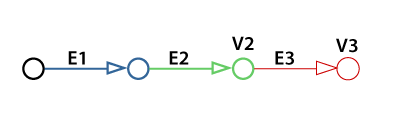
The next critical element in schedule modeling is a directional connector. It is an edge connecting two sequential activities (via vertices). Its purpose is to preserve the logic of the project execution under the resources’ constraints.
A typical example is a synchronization of workflow activities owned by different teams. If every activity in the above workflow is executed by a different team repetitively for areas A, B, and C of the project, the workflow transforms into its three-dimensional version. As seen, the middle activity E2 projections are connected with connectors C2a and C2b (Fig.2). 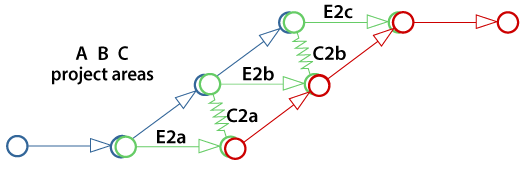
The second case of the connector application is shown in Fig.3. The E4 activity should start if all three predecessors E1, E2, E3 are finished. The C1 and C2 connectors store positive floats to be introduced to preserve the execution logic. 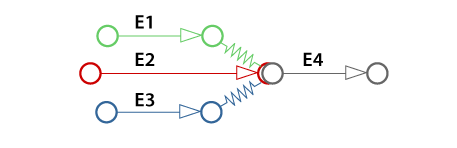
An activity’s output may be a condition for starting or resuming an activity in another workflow. Fig. 4 shows the case where middle points of two workflows are interconnected. Connectors enforce the project execution concurrency. It is a key quality indicator of the schedule. 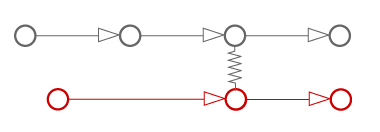
The final fundamental principle of the schedule modeling is multi-layering. It states that any activity may be a container for other finely defined sub-workflows. Fig.5 shows two sub-workflows represented by an unordered list of activities and a subgraph. The latter is indispensable for the integration of contractors' and OEMs' schedules. 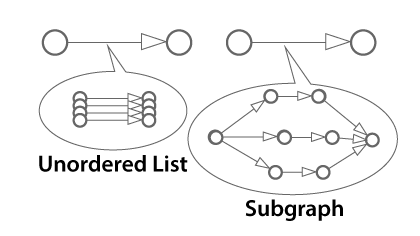
Several rules govern schedule modeling (building an activity graph).
1. Activities and workflows should have unique generic names. They should not contain any reference to codes used for project areas, P&IDs, or control modules. This information type is embedded in the scope object that is owned by the activity. Project Management Institute (PMI) practices and Defense Contract Management Agency (DCMA) standards request the opposite.
2. Activity names should not denote the work scope. During auto-generation of a schedule for a multi-area project, the same generic activity is copied several times and attached to a different scope.
specific activity = generic activity * specific scope
3. Each activity should have at least one predecessor and one successor. This is always true if the project schedule is strictly modeled by a unidirectional graph with a single start and end point. PMI supports this rule. DCMA standards permit 5% of activities without predecessors or successors to account for Level-of-Effort (LOE) activities. They do not contribute directly to project execution, but they support its activities. Resource management, accounting, and work safety are LOE examples.
4. LOEs are normal activities. While PMI cautions against the inclusion of LOEs in the schedule, DCMA forbids their use. Crenger.com considers LOEs normal activities, as they consume resources and billable time (in case they are outsourced, which is a normal practice).
5. No activity should be dangling. A dangling activity does not have either a successor or a predecessor. It is an obvious logical error easily caught during validation. Interestingly, PMI is permissive regarding dangling activities, as it considers them unavoidable.
6. Workflows and activities’ relationships shall be logical, not time-based. The schedule auto-generation algorithms use only relative dates extracted from purchase orders. The activity duration is a predicted output.
7. All activity relationships shall be of the Finish-to-Start (FS) type. While PMI and DCMA label FS as a dominant type, crenger.com considers it the only type applicable to modeling schedule logic.
8. The lag time sum should be optimally low. Lag time is the waiting period or delay between a predecessor activity and a dependent successor activity. The lag time sum is a direct indicator of project concurrency quality. (DCMA limits the lag quantity to 5% of all activities.) The only way to change the lag time sum is through resource optimization.
9. Dependency leads are not allowed. Dependency lead, or an activity lead time, is the amount of time a dependent activity can start earlier than its predecessor finishes, allowing tasks to overlap. The biggest drawback of dependency lead is an inadvertent mix of data with different levels of credibility. Crenger.com does not allow using leads to compress the schedule. DCMA completely forbids dependency leads.
10. Date constraints shall be modeled with connectors. If an activity has predecessors and should start after a specific date, the predecessors and the activity should be connected with the connector storing the specific date. Such date-constrained connectors are subject to schedule optimization.
11. Duration of a simple activity is limited. By definition, atomic or simple activities do not contain other activities. In agreement with PM and DCMA practices, crenger.com sets the maximum allowed duration of simple activities to 44 working days, equivalent to 2 calendar months.
The current version of PlantDesigner contains over 30 generic workflows. Together with the project scopes, they are used for auto-generation of the schedule model.